Sephiya: Sweet Display Font for Handmade Creations
When you run a small handmade shop, every detail matters. The curve of a letter, the weight of a stroke, the way a name catches the light on a label—these tiny moments shape how customers feel about your products. That’s where Sephiya comes in. It’s a sweet, delicate display font that brings a soft, romantic energy to everything it touches. I’ve been working with fonts for years, designing printables, stickers, and wedding stationery, and I can tell you that a typeface like this changes the whole game. It’s not just a font; it’s the quiet voice that says, “This was made with care.”
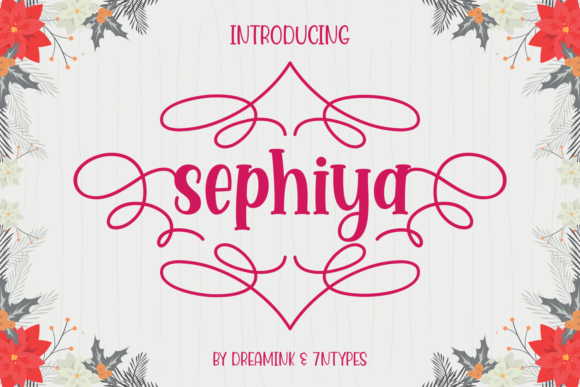
Sephiya has a charming, airy presence. The letterforms are gentle, with a lyrical flow that feels almost handwritten, yet it holds the polish of a carefully crafted display typeface. It’s not overly fussy or thin—it strikes a balance that makes it versatile enough for many different craft projects. The visual personality is warm, inviting, and just a little whimsical. Think of it as the font equivalent of a hand-tied ribbon or a pressed flower on a thank-you card. It adds that layer of intentional sweetness without screaming for attention.
Why Sephiya Feels Like a Studio Staple
For makers who create physical products, a font must do more than look pretty on a screen. It needs to cut cleanly, print sharply, and hold its charm when scaled up for a sign or down for a tiny sticker. Sephiya was built for that kind of creative work. Its delicate lines are substantial enough to survive the weeding process on a Cricut or Silhouette machine, and the open counters keep the letters legible even at smaller sizes. When I tested it on a set of 2.5-inch round labels for handmade candles, the result was crisp and readable, with a softness that made the product feel high-end. The font’s personality shines on short phrases, product names, and decorative headings, making it a go-to for any project that needs a dash of elegance.
Because Sephiya is a display font, it’s naturally suited for titles, names, and brief statements rather than long paragraphs. You wouldn’t want to set an entire policy page in it, but that’s not what it’s for. Use it to highlight the star of the show—a bride’s name on an invitation, the scent name on a soy candle label, a meaningful quote on a nursery wall print, or a shop logo on a hang tag. When you treat it as a focal point, the font’s sweet character truly shines.
From Labels to Wedding Signs: Real-World Uses
I’ve found Sephiya to be incredibly adaptable across a range of product types. Here are a few ways I’ve used it—and how you might, too:
- Handmade labels and product packaging: Whether it’s a small batch of herbal tea tins, artisan soap wrappers, or lip balm tubes, Sephiya adds a boutique feel. The delicate curves soften the industrial look of a plain jar and instantly make the product feel curated.
- Stickers and decals: For vinyl decals meant for laptops, water bottles, or planner covers, this font stays readable even when cut at moderate sizes. The swashes and alternates let you create custom, one-of-a-kind sticker sheets that sell out fast.
- Wedding and event stationery: Invitation suites, place cards, menus, welcome signs, and favor tags all benefit from a font that feels celebratory but not overdone. Sephiya’s gentle rhythm pairs beautifully with floral motifs and watercolor backgrounds.
- Printable wall art and digital downloads: For sellers who focus on printables, a font like this can become a signature element. Use it for inspirational quotes, family name signs, baby milestone cards, or seasonal décor. The PUA encoding makes it easy to access alternate glyphs right in your design software, so each piece can feel tailor-made.
- Fabric and apparel projects: Heat-transfer vinyl designs on tote bags, baby onesies, or throw pillows take on a soft, homespun quality with Sephiya. The font’s sweet personality works especially well for Mother’s Day creations, bridal party shirts, and nursery items.
- Farmhouse and rustic signs: Paired with a simple sans serif, Sephiya can anchor a modern farmhouse sign. Imagine a wooden plaque that reads “Gather” or “Welcome to our home” in this flowing font—it adds warmth without straying into cliché territory.
The Impact of a Delicate Display Font on Your Brand
As a handmade seller, consistency is what builds recognition. When you choose a typeface like Sephiya and use it thoughtfully across your product line, packaging, and social media graphics, you’re building a visual identity that customers begin to trust. The font’s sweet, delicate nature can signal that your brand is approachable, feminine, and detail-oriented. It elevates the perceived quality of your items—a simple bar of soap suddenly feels like a luxury gift, a printable chore chart becomes a charming piece of home décor, and a sticker sheet looks like a premium stationery find.
Emotionally, fonts like Sephiya tap into nostalgia and comfort. They remind people of handwritten letters, lace, and sunlit afternoons. That emotional pull is what turns a casual browser into a repeat buyer. When your product photography shows a label or a sign that feels intentional and beautifully typeset, it creates a connection before the customer even reads the description. That’s the power of a thoughtful display typeface.
Readability and Cutting Machine Tips
One of the biggest worries for Cricut and Silhouette users is whether a font will weed cleanly or blur together when cut. Sephiya’s hairline strokes are elegant, but they aren’t so thin that they disappear. I recommend doing a test cut at the size you plan to use most often. For small stickers under 1.5 inches, consider using the simpler alternates without the extended swashes, or increase the letter spacing slightly to avoid parts catching. On printed materials like invitation inserts or hang tags, the font prints beautifully even at 10–12 points for short lines, though I find it most comfortable around 14 points and above for display purposes.
When you’re designing mockups for your shop, use Sephiya to show customers exactly how the personalization will look. Type out a realistic name or phrase, apply the swashes, and take a screenshot. This helps clients visualize the final product and reduces back-and-forth. Because the font is PUA encoded, you can access all those gorgeous alternates and ligatures directly in Cricut Design Space, Silhouette Studio, Adobe Illustrator, or even Microsoft Word, without needing a separate glyphs panel. Just turn on your character map or use the stylistic alternates features, and you’ll find a treasure trove of flourishes.
Pairing Sephiya with Other Fonts
A single display font rarely stands alone. The best designs use contrast to guide the eye. Sephiya’s sweet, flowing silhouette pairs wonderfully with clean, straightforward typefaces that let it take center stage. Here are a few pairing ideas that have worked well in my own projects:
- With a modern sans serif: Try a geometric sans like Montserrat or a crisp, neutral sans like Open Sans for product labels. The no-nonsense structure balances Sephiya’s decorative nature, and the result looks polished and current.
- With a simple serif: A classic serif such as Playfair Display or Cormorant Garamond adds a layer of timeless sophistication. This combination is perfect for wedding invitations or upscale product packaging.
- With a handwritten script: Pair Sephiya with a light, casual script font for a charming, layered look. Use the script for the main name and Sephiya for the supporting text, or vice versa. Just be careful not to overdo it—two highly decorative fonts can compete.
- With a minimalist monoline: A thin monoline sans serif or a simple typewriter font can create a lovely boho vibe for tags, journal covers, and social media graphics.
When you experiment with pairings, always keep the overall mood of your product in mind. Sephiya brings sweetness; the secondary font should either complement that by being equally soft, or provide a contrasting anchor that sharpens the design.
Unlocking All Those Sweet Extras
One of the standout features of Sephiya is that it’s PUA encoded. For anyone who designs printable products, sells SVG templates, or creates custom vinyl decals, this is a game-changer. PUA (Private Use Area) encoding means that all the extra glyphs, swashes, and ligatures are mapped to characters you can easily access, even in software that doesn’t have advanced OpenType panels. You can type out a name, add a heart-shaped swash at the end, or substitute a fancier letterform for a capital, all from your keyboard or a basic character map. This ease of use means you spend less time fussing with font files and more time creating.
Be sure to check the included file formats when you install the font. Typically, a premium font like Sephiya comes with both OTF and TTF versions, which cover all common design software and cutting machines. If the font also offers multilingual support, you’ll be able to serve a wider audience with accented characters for European languages, making your products even more versatile for international customers.
Making Sephiya Work for Your Business
If you’re selling physical products, digital downloads, or templates, font licensing is a topic you can’t afford to skip. Most premium fonts, including display fonts like Sephiya, come with a standard commercial license that allows you to use the typeface on items you sell. However, the details can vary. Some licenses may restrict the number of sales, require you to flatten the font in a design file, or limit use in editable templates. Always read the license agreement that comes with your download. For a font that you plan to use across product labels, packaging, SVG designs, printable wall art, and client work, you want a license that covers those uses without any surprises.
When you’re just starting out, a single versatile display font can become the backbone of your brand identity. Sephiya, with its sweet, delicate charm and practical PUA features, fits that role beautifully. It’s the kind of typeface that makes your mockups sing, helps your stickers stand out in a crowded market, and gives your handmade products that unmistakable “I made this with love” feeling. Add it to your toolkit, and watch how it transforms your designs from simple to memorable.